> ## Documentation Index
> Fetch the complete documentation index at: https://developer.breakcold.com/llms.txt
> Use this file to discover all available pages before exploring further.
# How Do I Manage Email or In-App Notifications in Breakcold?
> How Do I Manage Email or In-App Notifications in Breakcold?
## How Do I Manage Email or In-App Notifications in Breakcold?
**Step 1: Open Notification Settings**
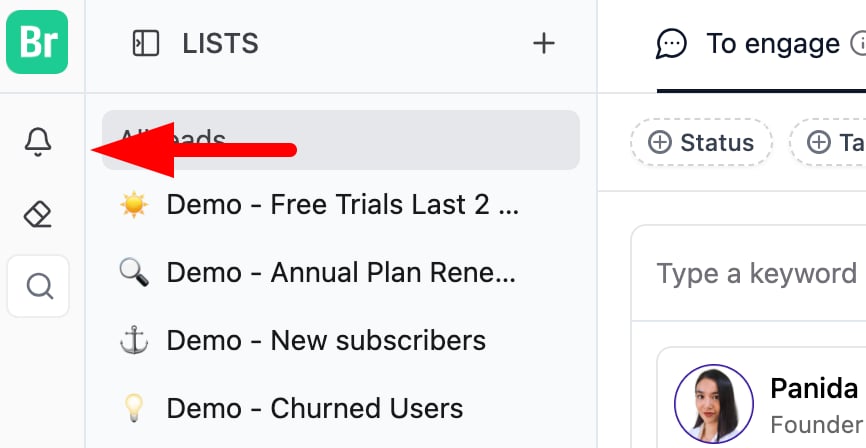
Click the **Bell icon**
 (usually located at the top left of the screen).
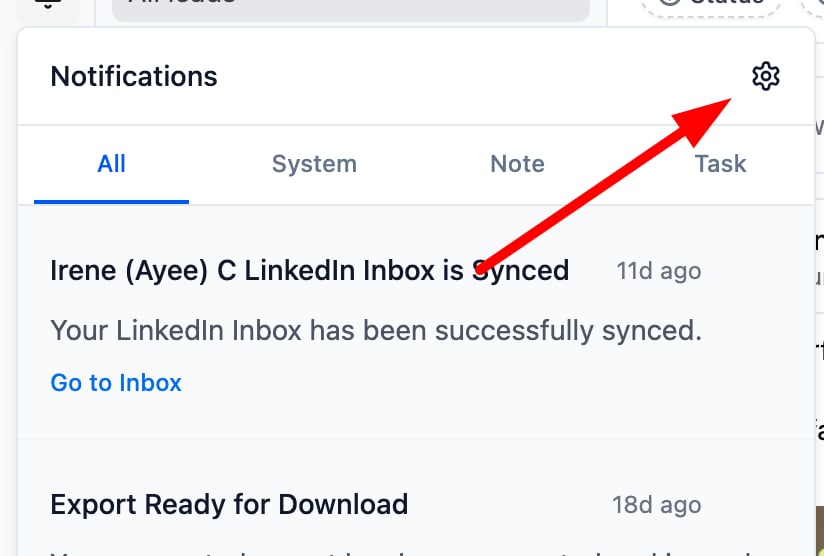
 Then, click the **Cogwheel icon**
 to open the notification settings.
 **Step 2: Navigate to Global Preferences**
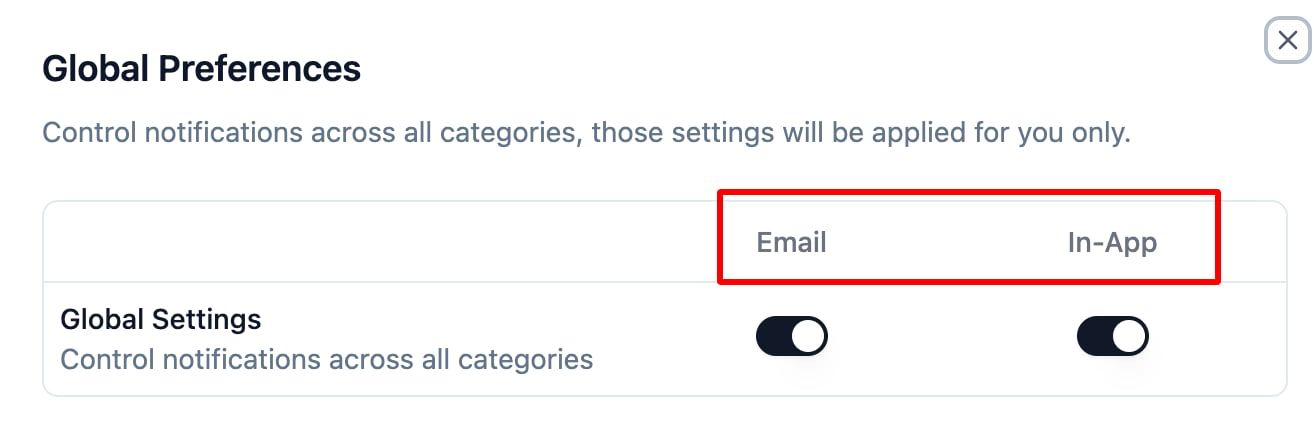
Once in the Notification Settings, go to **Global Preferences**.
Here, you’ll find two sections:
* **Delivery Type**
* **Notification Type**
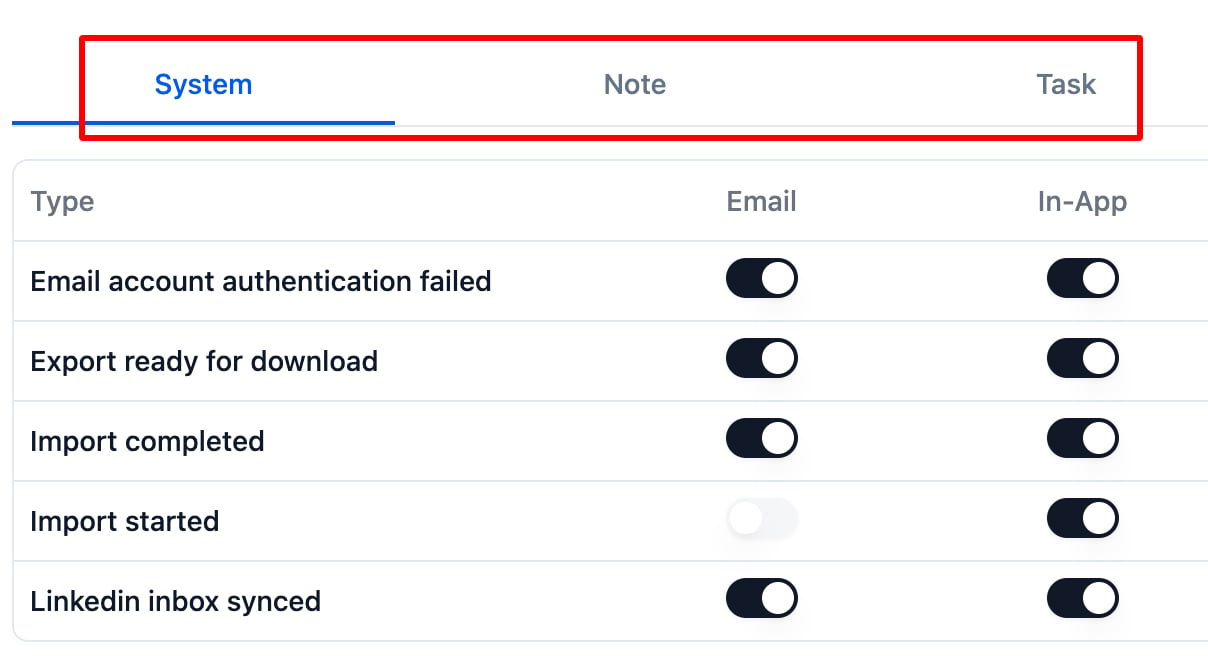
**Step 3: Choose Notification Types**
You can enable or disable notifications for various activities, including:
* **Task updates**
* **Note replies or tags**
**System alerts** (e.g., import complete, authentication failed)
**Step 2: Navigate to Global Preferences**
Once in the Notification Settings, go to **Global Preferences**.
Here, you’ll find two sections:
* **Delivery Type**
* **Notification Type**
**Step 3: Choose Notification Types**
You can enable or disable notifications for various activities, including:
* **Task updates**
* **Note replies or tags**
**System alerts** (e.g., import complete, authentication failed)
 **Step 4: Select Your Delivery Method**
For each notification type, select how you want to receive alerts:
* **In-App** – Notifications appear directly inside Breakcold.
**Email** – Notifications are sent to your inbox.
**Step 4: Select Your Delivery Method**
For each notification type, select how you want to receive alerts:
* **In-App** – Notifications appear directly inside Breakcold.
**Email** – Notifications are sent to your inbox.
 **Step 5: Adjust Your Preferences**
Use the toggle switch next to each notification type to turn it **on** or **off** based on your preference.
## 💡 Tips for Managing Notifications
* **Tip 1:** Receiving too many emails? Disable email alerts for less urgent updates and rely on in-app notifications.
* **Tip 2:** Keep system alerts enabled so you don’t miss critical events.
* **Tip 3:** Not seeing any notifications? Double-check your email address and check your spam/junk folder.
* **Tip 4:** Prefer in-app if you're actively using Breakcold. Use email if you check in occasionally.
## 👉 Learn More
[Click here](https://intercom.help/breakcold/en/articles/9826620-how-to-manage-notifications) to read the full guide on notifications and best practices.
**Step 5: Adjust Your Preferences**
Use the toggle switch next to each notification type to turn it **on** or **off** based on your preference.
## 💡 Tips for Managing Notifications
* **Tip 1:** Receiving too many emails? Disable email alerts for less urgent updates and rely on in-app notifications.
* **Tip 2:** Keep system alerts enabled so you don’t miss critical events.
* **Tip 3:** Not seeing any notifications? Double-check your email address and check your spam/junk folder.
* **Tip 4:** Prefer in-app if you're actively using Breakcold. Use email if you check in occasionally.
## 👉 Learn More
[Click here](https://intercom.help/breakcold/en/articles/9826620-how-to-manage-notifications) to read the full guide on notifications and best practices.