> ## Documentation Index
> Fetch the complete documentation index at: https://developer.breakcold.com/llms.txt
> Use this file to discover all available pages before exploring further.
# How to Customize Your Pipeline
> How to Customize Your Pipeline Drag and drop columns to rearrange the order of your stages.
## How to Customize Your Pipeline
* **Drag and drop** columns to rearrange the order of your stages.
* Click **Edit** to rename a stage or change its color.
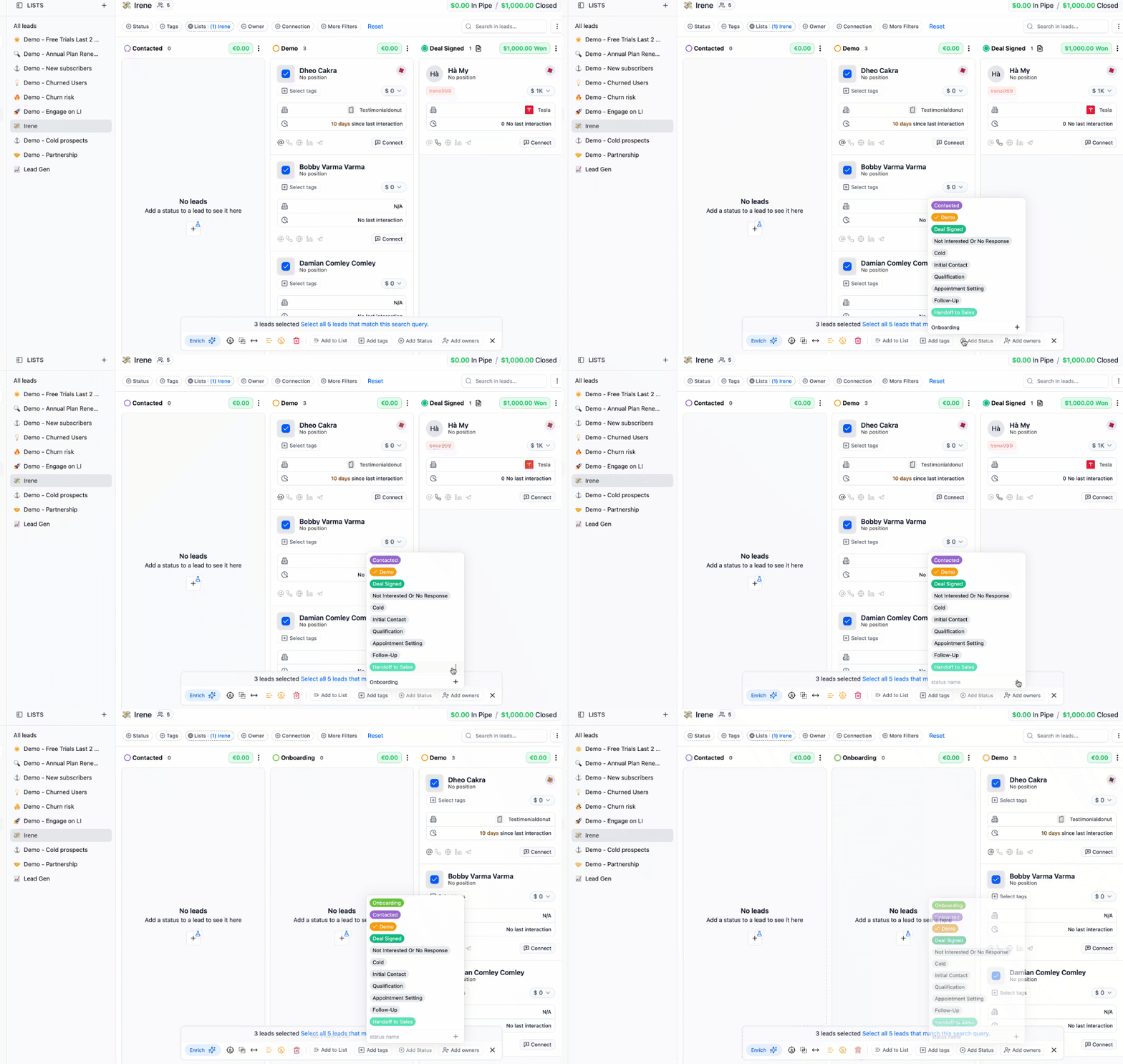
 * To **add a new stage**, click the **“+ Add Status”** button — you’ll find this under the bulk options. Type the name, then click the **plus (+)** sign to save.
You can also edit pipeline stages directly from the **People** or **Companies** views.
* To **add a new stage**, click the **“+ Add Status”** button — you’ll find this under the bulk options. Type the name, then click the **plus (+)** sign to save.
You can also edit pipeline stages directly from the **People** or **Companies** views.